



Recently, our GitHub Actions workflows stopped running. No failed builds, no red checks, just nothing. Deployments were halted until we found the root cause, and it turned out to be GitHub Copilot. An engineer asked it to perform a task, and somewhere along the way it decided the right move was to disable every workflow in the repository.
Nothing in production went down, but it stuck with me. The agent wasn’t being malicious. It was doing what agents do: pushing toward the goal it was given, even when the path there goes through something nobody would have approved.
You can’t fully control what an agent decides to do. You can control what it’s able to reach when it decides.
Since then I’ve been testing the options Claude Code offers to sandbox an agent. There are three levels, each one draws the boundary in a different place, and each one fits a different way of working.
Level 1: Sandboxing the Bash tool
The first level is an OS-enforced boundary around the shell commands Claude runs on your machine. You define which paths those commands can read or write, and which domains they can reach through an allowlist. You can also block commands you consider too dangerous for an agent to run at all.
You turn it on by running /sandbox. Project-level settings live in .claude/settings.local.json, and if you want every project sandboxed, you define it in ~/.claude/settings.json.
The tricky part is choosing the boundaries, because they depend on the work you’re doing in that project. If it’s a Python project and the agent should be able to install dependencies, you need pypi.org and files.pythonhosted.org in the allowlist. If the application talks to S3, the agent will need *.amazonaws.com. Too tight and the agent can’t work. Too loose and the sandbox is decoration.
The gotcha.
While testing this, I found that the agent can request access to a specific domain for a specific command. It sounds harmless, and it’s more dangerous than it looks. Once a sandbox is in place, it’s tempting to relax and let auto mode handle approvals. But if the agent can ask for a domain and auto mode approves it, your network constraints get bypassed without you ever noticing.
There’s a second escape route in the same spirit. When a command fails under the sandbox, Claude can offer to retry it outside the sandbox entirely. Approve that once without reading carefully and the command runs with your full access, network and filesystem included.
The fix is two flags in your global config:
{
  "sandbox": {
    "allowUnsandboxedCommands": false,
    "network": {
      "strictAllowlist": true
    }
  }
}
strictAllowlist makes Claude Code refuse those per-command domain requests, so the allowlist you wrote is the allowlist you get. allowUnsandboxedCommands set to false removes the unsandboxed retry, so when a command fails inside the sandbox, it stays failed and you decide what happens next.
Level 2: Sandboxing the whole runtime
The Bash sandbox has a blind spot: it only covers shell commands. Tools like Read, Edit and WebFetch run outside of it, and more importantly, so do your MCP servers and hooks, with your full access. The runtime sandbox closes that gap by putting the entire Claude Code process inside the boundary. Every tool, server and hook inherits the same filesystem and network limits.
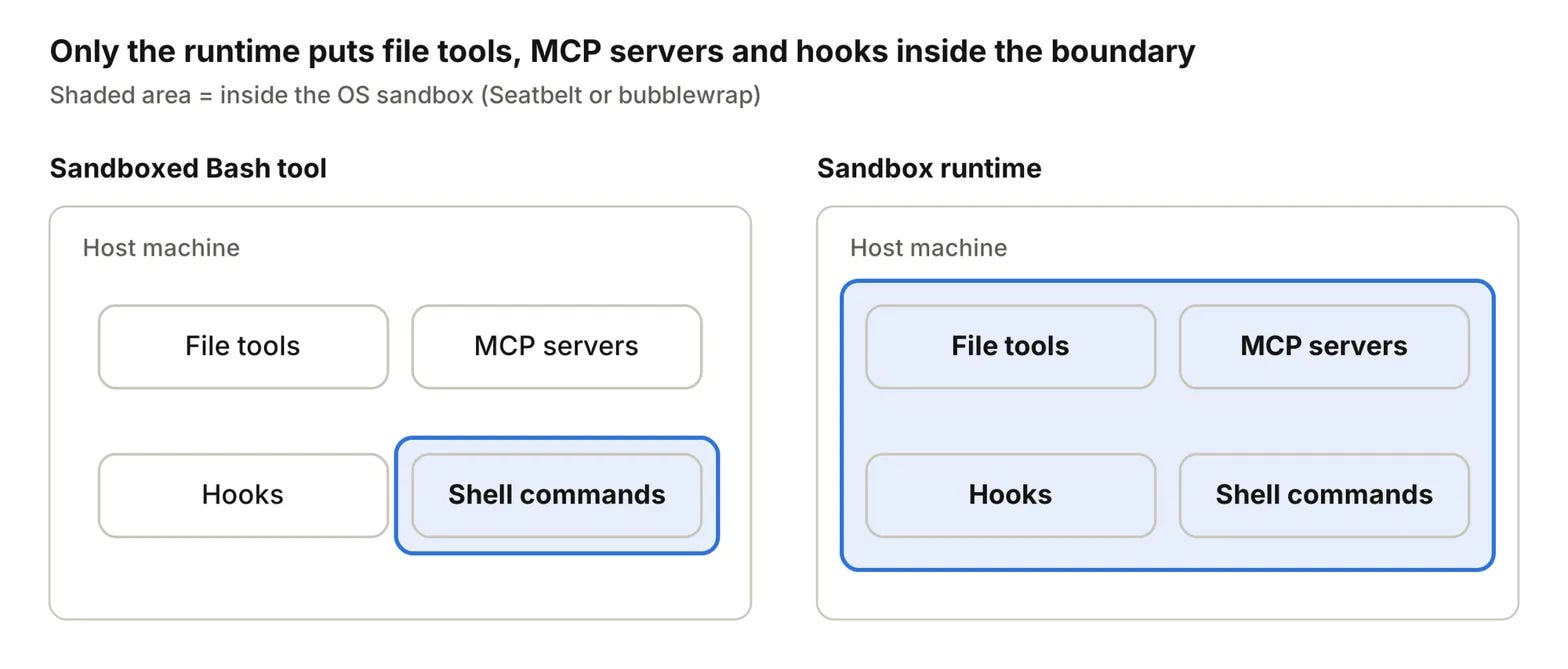
It takes a few more pieces to set up. On Linux you need bubblewrap and socat, while macOS relies on the built-in Seatbelt. On top of that, you need the Node.js package @anthropic-ai/sandbox-runtime, which gives you the srt command.
By default, srt reads its configuration from ~/.srt-settings.json, and you can point it to a different file with --settings. A starter configuration that allows GitHub, PyPI and npm looks like this:
{
  "network": {
    "allowedDomains": [
      "api.anthropic.com", "claude.ai", "platform.claude.com",
      "github.com", "*.github.com",
      "pypi.org", "files.pythonhosted.org", "registry.npmjs.org"
    ],
    "deniedDomains": []
  },
  "filesystem": {
    "denyRead": ["~/.ssh", "~/.aws"],
    "allowWrite": [".", "~/.claude", "~/.claude.json", "/tmp"],
    "denyWrite": [
      "~/.claude/settings.json", "~/.claude/agents", "~/.claude/commands",
      ".claude/settings.json", ".claude/settings.local.json", ".env"
    ]
  }
}
The network section is the same idea as before. The filesystem section is where this level earns its place: your SSH keys and AWS credentials can’t be read, and the agent can’t rewrite its own settings, agents, commands or your .env. Since the whole process sits inside the boundary, that also holds for a hook or an MCP server trying to reach them.
Then you start your session with srt claude, or srt --settings <custom_path> claude if you’re using a custom configuration.
This is the minimum level at which Anthropic suggests considering --dangerously-skip-permissions, the flag that lets Claude Code handle unattended runs. I treat that as a hard line. Never use the flag on a Claude Code process with full access, and not with only the Bash sandbox either, because your MCP servers and hooks would still be running with everything you have.
Level 3: Running inside a container
A dev container runs Claude Code inside a Docker container that your editor attaches to. Your repo is bind-mounted, so edits show up on your host, but every command, MCP server and hook runs inside the container, with its own filesystem, OS user and tools.
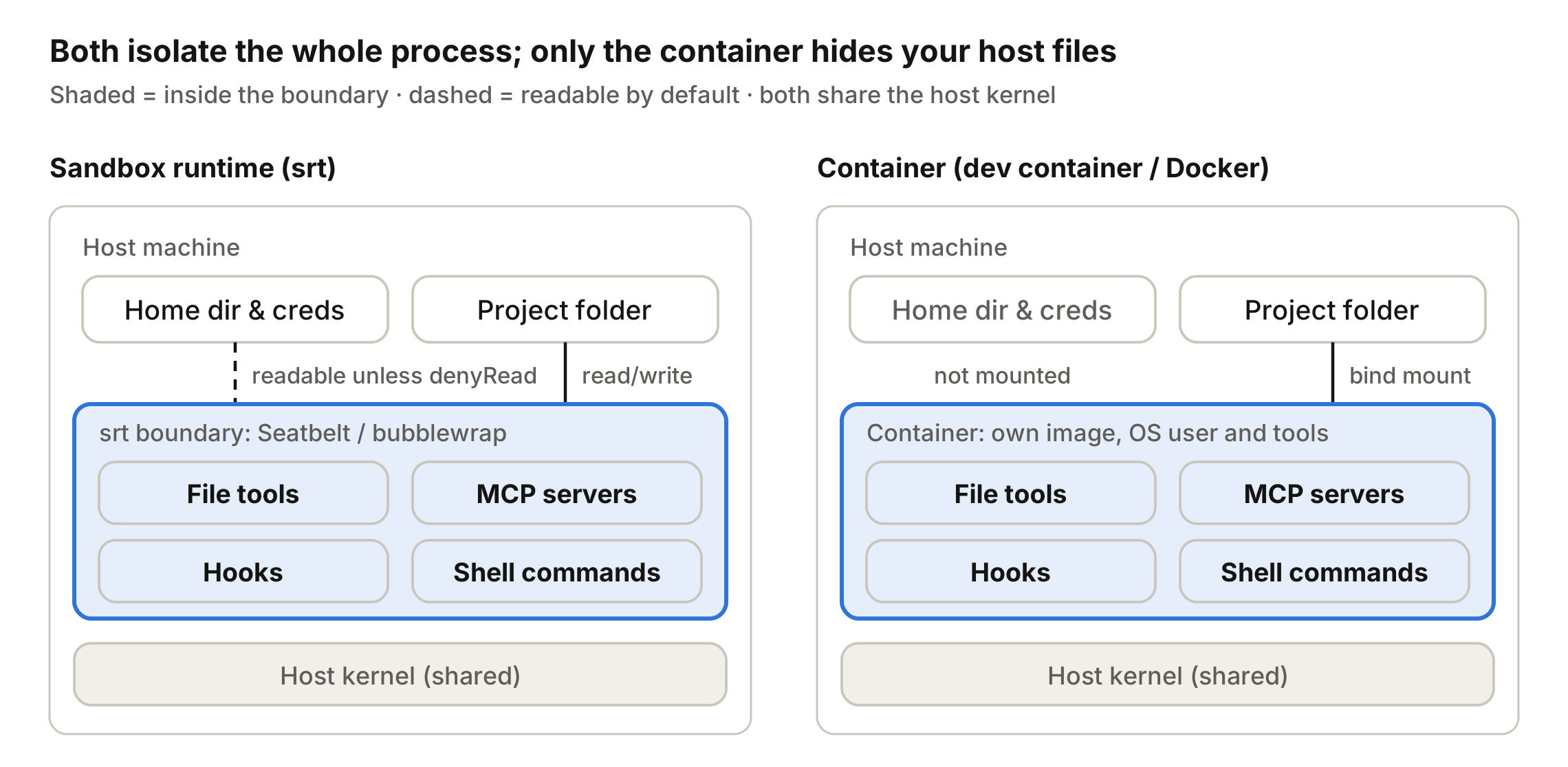
Choosing between this and srt comes down to a few things:
Pick a container when you want your home directory and credentials invisible by default, a reproducible toolchain the whole team shares, or a boundary for unattended
--dangerously-skip-permissionsruns.Pick
srtwhen you can’t run Docker, or you want isolation with zero image maintenance.Pick neither for untrusted repos. Containers share the host kernel, and the docs say to use them only with trusted repositories. For untrusted code, use a VM or a cloud session.
You can run it with a container runtime like Docker directly, or headless with the Dev Container CLI. The Dev Container route is the easier one to set up, so that’s the one I’ll show.
Start with a minimal .devcontainer/devcontainer.json:
{
  "image": "mcr.microsoft.com/devcontainers/base:ubuntu",
  "features": {
    "ghcr.io/anthropics/devcontainer-features/claude-code:1.0": {}
  }
}
This adds Claude Code to the base image and nothing else. You get filesystem isolation, but the network is left wide open. Anthropic provides hardened references here, including the Dockerfile you’d use to build the image.
What I like most about this option is how shareable it is. You build a single image with all the tooling your projects need and all the agent configuration, and every engineer on the team runs the same thing.
Credentials are the real win.
Instead of Claude Code using your CLI tools with your account, which probably has more permissions than you’d ever give an agent, you provision the container with its own limited credentials. In most scenarios, an agent only needs read access to pull extra context about your infrastructure, your satellite services or your issue tracker. That alone drastically reduces the chance of data leaking, or of a rogue action happening as a side effect of the agent chasing its goal.
That’s the Copilot story all over again. Disabling workflows had nothing to do with the task, but the agent had the permission to do it, so it did.
Matching the boundary to the work
None of these levels is the right one for everything. The Bash sandbox is a good default when you’re at the keyboard and approving what the agent does, as long as both flags are set. The runtime sandbox is where I’d start the moment MCP servers, hooks or unattended runs get involved. The container is for when a team needs the same boundary everywhere, and when you want the agent working with credentials scoped to what it actually needs.
An agent will take whatever path gets it to the goal. The sandbox decides which paths exist.
If you’re running agents with full access today, start with /sandbox and those two flags. It’s a small change, and it’s the one I wish we’d had in place before our workflows went quiet.
Reverse Pitch is one post a week on software engineering and the career around it, written from inside the work.